

Deposit PH33 is extremely simple through many flexible payment methods, players can choose banks, e-wallets, or suitable forms to perform transactions quickly. The clear process and fast processing time ensure that funds are updated to the account reliably, guaranteeing an uninterrupted experience at PH33.
Instructions to deposit PH33 simply
Below are the detailed instructions to deposit PH33 to help players perform deposits quickly and accurately. Just follow each step, and you can complete the transaction easily to start experiencing right on the system.
How to send money using regular GCash
The deposit method via GCash is the most popular transaction way to help you quickly fund your account safely. Just provide the correct real name and payment account number, and the money will be updated by the system immediately.
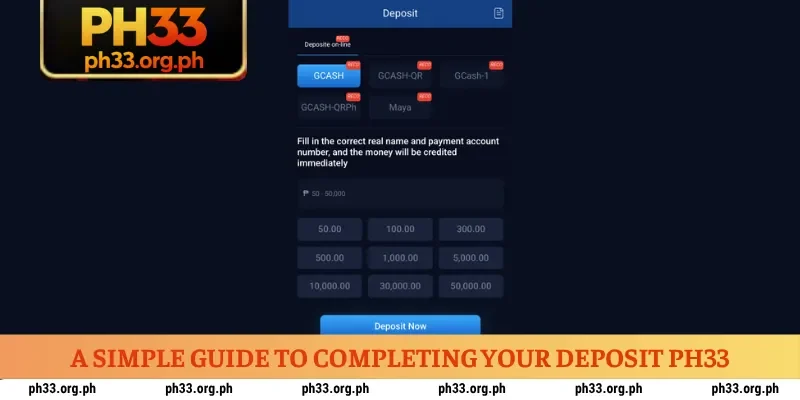
To perform a successful deposit, please follow the steps below:
- Step 1: Log in to the PH33 homepage, select the deposit section, and find the regular GCash payment method.
- Step 2: Select or enter the amount you want to deposit into the system, for example, 50.00 PHP, 500.00 PHP, or a maximum of 50,000.00 PHP according to your needs.
- Step 3: Fill in your correct real name and GCash account number so the system can automatically match the transaction order.
- Step 4: Take a screenshot of the transfer information displayed on the interface, then open the GCash app to proceed with transferring the money to the correct account number and content.
- Step 5: Re-check the transaction status in the deposit history; the money will be credited immediately once the transfer order is successfully confirmed.
Instructions to deposit PH33 using GCash QR
Using a QR code to deposit PH33 via GCash is the optimal method to help you eliminate manual input operations and avoid information errors. When you provide the correct real name along with the payment account number, the money will be processed by the system and added to your account immediately.
To perform the transaction, please follow these steps:
- Step 1: Access the deposit section on the interface and select the GCash QR deposit method.
- Step 2: Choose a deposit limit suitable for your needs, from a minimum of 100.00 PHP up to a maximum of 50,000.00 PHP.
- Step 3: Fill in your real name and official GCash account number accurately for the system to generate a transaction authentication code.
- Step 4: Save the QR code image provided by the system to your phone, then open the GCash app and use the scan code feature to pay.
- Step 5: Complete the transfer order on the app and wait a moment for the system to update the balance in your account wallet.
Process of depositing using Maya e-wallet
The process to deposit PH33 through the Maya e-wallet brings players a fast, safe, and extremely reliable transaction experience. After completing the transaction, do not forget to log in the next day to receive attractive rewards at the reward center before 4:00 PM.
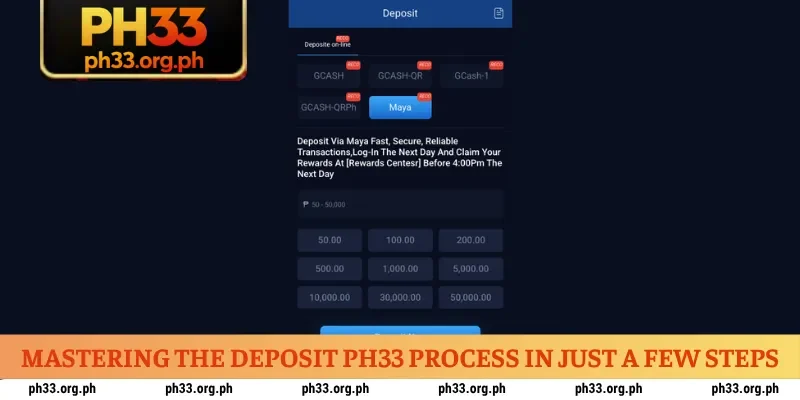
- Step 1: Log in to your account and access the deposit section, then select the Maya payment method.
- Step 2: Choose the amount you want to deposit from the list of available limits such as 50.00 PHP, 500.00 PHP, or up to 50,000.00 PHP.
- Step 3: Provide Maya account information as requested so the system can set up the transfer order accurately.
- Step 4: Confirm the transaction on your Maya app to complete the process of transferring capital into the betting account.
- Step 5: Check the available balance in your wallet and remember the time before 4:00 PM the next day to receive gratitude gifts at the Rewards Center.
Notes when you deposit PH33
Performing the deposit PH33 correctly according to the process will help you protect your capital and ensure the balance is updated to the account as quickly as possible. Players should take time to carefully check transaction information to avoid unnecessary errors causing delays in the experience process.
Check the destination account information
Absolutely do not reuse transfer information from previous transactions, as the system may change the receiving account periodically for security purposes. Performing a deposit PH33 into old or invalid accounts can lead to loss of assets and difficulties in reconciliation.
Transfer the exact amount and content
The automated transaction processing system requires players to enter the exact registered amount and transfer content according to the provided code. Especially for transactions in PHP, ensure you have calculated the correct limits so the order to fund your betting wallet is approved immediately.
Keep the transaction invoice
After completing the transfer operation on the banking app or e-wallets like GCash or Maya, you need to take a screenshot of the successful invoice. Storing transaction proof will help you be more proactive and protect your rights in any situation that arises when performing a deposit PH33.
How to handle errors when depositing money
During the transaction process, sometimes players may encounter some interruptions that prevent the deposit request from being processed immediately. Knowing the causes and how to fix them will help you proactively handle the situation to quickly continue the experience at PH33.
| Common Error Types | Quick Handling Method |
| Balance not updated | Wait 5 to 10 minutes and re-check transaction history in the Security Center |
| Incorrect transfer content | Contact customer service immediately and provide a photo of the invoice for manual matching |
| Transferred to old account | Provide proof of transaction to support staff to check for recovery or special support |
| Incorrect registered amount | Create a new deposit order exactly with the transferred amount or ask support to adjust |
| Payment app error | Check the network connection, restart the payment app, and perform the QR code scan again |
Conclusion
Players can deposit PH33 through Maya or GCash e-wallets with flexible limits. By following the correct instructions, the transaction process will take place seamlessly. The house is currently organizing a series of attractive deposit promotions for you to freely choose and participate in every day.

Heart Evangelista is the visionary CEO of PH33, the Philippines’ premier luxury digital gaming platform. Renowned as a global style icon, she brings her signature sophistication and commitment to excellence to the gaming industry, ensuring PH33 stands as a gold standard for secure, high-end entertainment and elite user experiences.
 Withdrawal PH33 Via 3 Channels For Instant Rewards
  Register PH33 Is Simple – Receive 8,888 PHP Instantly
  PH33 App – Download Now (Android/iOS) To Bet Daily
  Login PH33 In Just 4 Steps – Receive 30% Insurance Bonus